How to Give an AI Agent Access to Amazon Seller Central Without Sharing Credentials
Rank the ways to connect Claude, ChatGPT or a custom agent to Amazon by what the agent holds, read a real MCP OAuth challenge, and review any connection.
To give an AI agent access to Amazon Seller Central without exposing credentials, never hand it your Seller Central password, a signed-in browser session, or your Selling Partner API refresh token and client secret. Connect the agent over OAuth to a service that holds the Amazon authorization for it: Amazon's own Selling Partner plugin, a server you run, or a managed MCP server. The agent then holds a short-lived, scoped token you can revoke. Amazon's rules for API developers point the same way: they may not ask sellers for Seller Central usernames or passwords.
This guide ranks access methods by what the agent holds, reads a real authorization challenge line by line, and ends with a checklist for any connection, ours included. For setup steps, see the guides for connecting Claude to Amazon Seller Central and connecting ChatGPT to Amazon Seller Central.
The credential exposure ladder
Three questions decide the risk: what the agent or its machine holds, what a leak would allow, and how fast you can make the secret useless. The table runs from most exposed to least.
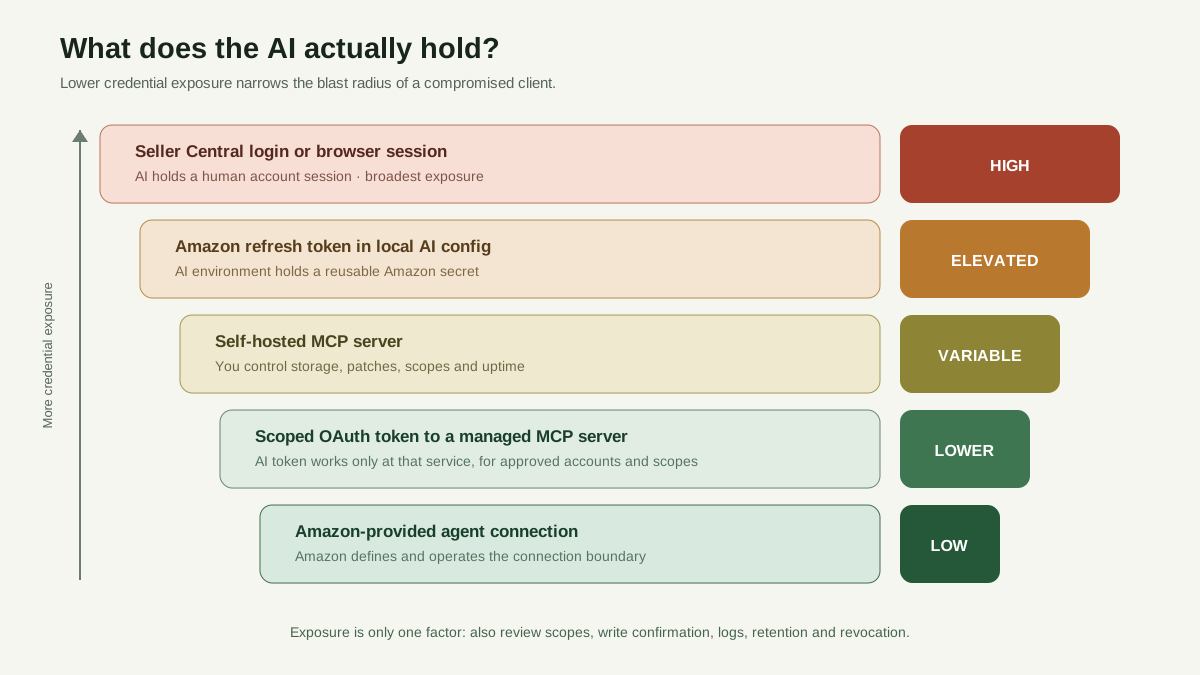
A scoped service token reduces credential exposure, but you should still evaluate permissions, write confirmation, logs, retention and revocation.
| Access method | What the agent holds | Blast radius if it leaks | How to revoke |
|---|---|---|---|
| Seller Central password or browser session shared with a browser agent | Your login or a signed-in session, plus everything on screen. With a cloud-hosted browser, the vendor holds it too. | Everything that user can do in Seller Central, which for the primary user includes account settings and user permissions | Change the password and review two-step verification. If the agent had its own secondary user, remove it. |
| Local MCP server with your LWA refresh token and client secret in a config file | The refresh token, client ID and client secret, readable by anything that can read the file | Anyone with all three can mint one-hour access tokens for every operation your app's roles allow, including buyer data through Restricted Data Tokens if you hold restricted roles | Revoke the authorization, then rotate the client secret. Amazon says old secrets expire seven days after you generate new ones. |
| Self-hosted remote MCP server you control | An OAuth token for your server, if you build the MCP authorization flow | A leaked client token reaches only what your server allows. A breached server exposes the Amazon secrets above. | Revoke on your own authorization server and on Amazon |
| Scoped OAuth token to a managed MCP server, such as Agentic Sellar | A short-lived access token and a rotating refresh token, issued for that server and grant | The scopes and accounts in the grant, within the server's limits. The token does not work against Amazon's APIs. | Revoke the connection with the provider, and disable its app authorization on Amazon's side. |
| Amazon's Selling Partner plugin (Seller Assistant in Amazon Quick, and Claude in beta) | A connection to Amazon's own plugin. Amazon's announcement does not describe the token model. | What Seller Assistant exposes. Amazon cites access boundaries, human approval on actions and audit trails. | Not described in the announcement |
The top two rows put a long-lived Amazon secret where the AI runs. The MCP authorization spec has local stdio servers read credentials from their environment, and its security best practices warn that other processes may reach a local server. Developers holding those credentials fall under Amazon's Data Protection Policy, which requires programmatic credentials to be encrypted at rest and never hardcoded. The bottom rows move the risk rather than remove it: a managed server holds your Amazon authorization, so ask how it is stored and who can reach it.
What Amazon policy says about logins and agents
Amazon's Acceptable Use Policy binds every solution provider that uses the Amazon Services API. It bars providers from requesting or accepting a seller's access keys (section 3.2) and from requesting Amazon portal usernames or passwords (3.3). If a provider needs portal access, the seller should grant it through secondary user permissions (3.7). A tool built on Amazon's APIs that asks for your Seller Central password is asking for something the policy forbids.
In a Seller Forums announcement, Amazon said Business Solutions Agreement updates effective March 4, 2026 add requirements for automated software or AI agents that access Amazon Services, under a new Agent Policy. Agents must identify themselves as automated systems, comply with the Agent Policy and stop access if Amazon asks.
What we could not confirm: the full Agent Policy sits inside Seller Central, and we could not review it from a public page. We found no Amazon statement on whether a browser or computer-use agent using a seller's login, or a secondary user, complies, or on how the policy treats tools built on the Selling Partner API. Read the Agent Policy in Seller Central and ask Amazon Seller Support before any agent operates your account.
Two sign-ins and no token passthrough
A remote MCP server for Amazon sits between two separate OAuth relationships, which our comparison of the SP-API, the Amazon Ads API and MCP introduces.
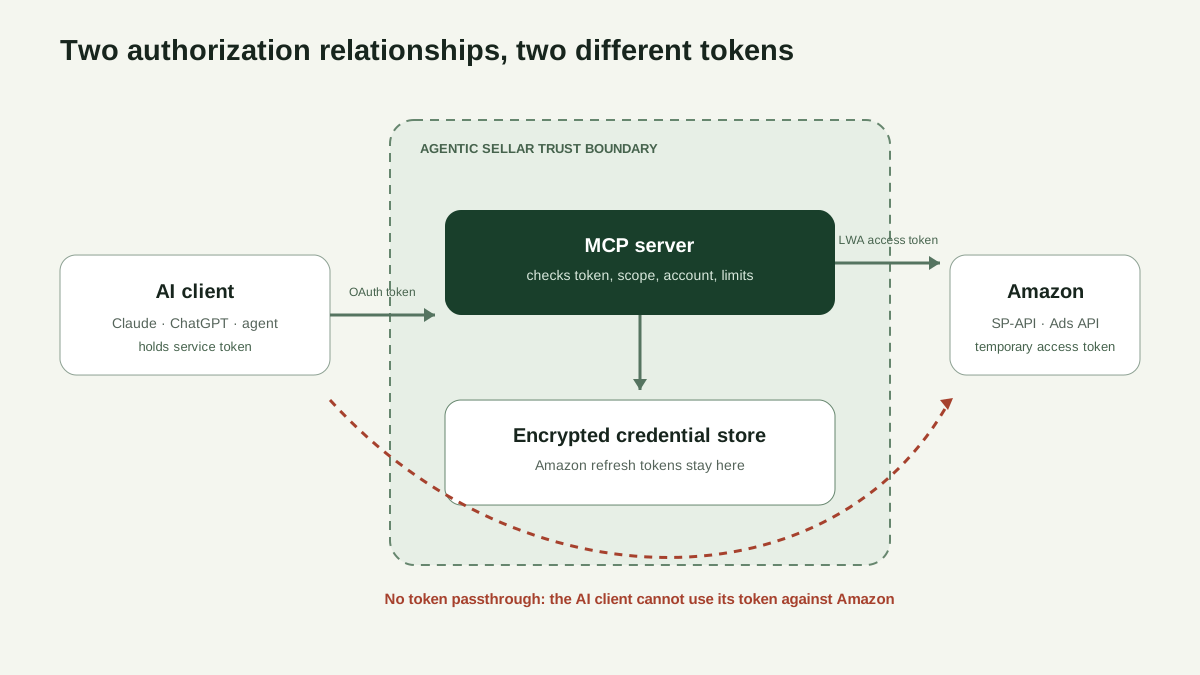
The AI client token is valid only for the MCP service. Amazon refresh tokens remain encrypted inside the service boundary.
- AI client to MCP server. Clients must name the server a token is for with the
resourceparameter from RFC 8707, and servers must accept only tokens issued for them. - MCP server to Amazon. The server exchanges its refresh token, client ID and client secret for an access token that expires after one hour. Operations that return buyer data also need a Restricted Data Token.
The spec forbids passing the client's token through to Amazon, because passthrough lets clients skip the server's checks and blurs the audit trail. The security best practices page also describes a "confused deputy" attack on servers that act as one OAuth client to a third-party API, and requires them to get your consent for each AI client before sending you to the third party.
Reading a real MCP authorization challenge
On October 19, 2026, we sent an unauthenticated request to Agentic Sellar's production MCP endpoint. The response, trimmed to the lines that matter:
POST https://agenticsellar.com/mcp
(no Authorization header)

HTTP/2 401
www-authenticate: Bearer resource_metadata="https://agenticsellar.com/.well-known/oauth-protected-resource/mcp", scope="workspace:read ads:read seller:read"

{"error":"invalid_token"}
HTTP/2 401. The spec requires a 401 for a missing, invalid or expired token. There is no fallback to a browser session.Bearer. The client must sendAuthorization: Bearerwith every request, never a token in the URL.resource_metadata="…". Defined in section 5.1 of RFC 9728, it tells the client where to learn how to sign in. Because the endpoint has a path, the well-known prefix goes before/mcp.{"error":"invalid_token"}. The same answer for a missing, expired or revoked token, so it reveals nothing about which.scope="workspace:read ads:read seller:read". The scopes a client should request first. A client following the spec asks for exactly these, so a new connection starts read-only. Without this parameter, the spec has clients fall back to every scope in the metadata.
The metadata document the header points to:
{
  "resource": "https://agenticsellar.com/mcp",
  "authorization_servers": ["https://agenticsellar.com"],
  "scopes_supported": ["workspace:read", "ads:read", "seller:read"],
  "bearer_methods_supported": ["header"]
}
RFC 9728 tells clients to discard the document unless resource matches the endpoint exactly, and each token is bound to that value. Tokens go only in the header. The write scopes (workspace:write, ads:write and seller:write) exist but are not advertised, because the MCP security best practices list publishing every scope in scopes_supported as a mistake. A connection gets a write scope only when an owner approves it: on the first consent screen, or after the client calls a write tool and the server answers 403 with error="insufficient_scope", naming the scopes the connection holds plus the one it needs.
From the authorization server metadata:
{
  "grant_types_supported": ["authorization_code", "refresh_token"],
  "token_endpoint_auth_methods_supported": ["none"],
  "code_challenge_methods_supported": ["S256"],
  "registration_endpoint": "https://agenticsellar.com/oauth/register",
  "revocation_endpoint": "https://agenticsellar.com/oauth/revoke"
}
none means AI clients are public clients, so no client secret sits in Claude or ChatGPT. PKCE with S256 ties the authorization code to the client that started the flow, and the spec requires refresh token rotation for public clients. Nothing here mentions Amazon. The AI client never learns which Amazon credentials exist.
A checklist for any AI connection to Amazon
Ask these of every setup, first-party ones included.
- Where do the Amazon credentials live? On a server, encrypted, never sent to the AI client. Red flag: a request for your Seller Central password, refresh token or client secret.
- What does the AI client hold? A short-lived token for that one server, not a long-lived key pasted into the AI tool.
- Which scopes? Read and write split by data area, with a consent screen that shows what was requested. The MCP security guidance calls omnibus, all-access scopes a common mistake.
- Which accounts? You choose the seller and advertising accounts. Check whether an "all accounts" option also covers accounts connected later. Agencies should give each client its own grant.
- How are writes confirmed? Find out what the server refuses on its own. The MCP tools spec tells clients to treat tool annotations as untrusted unless the server is trusted, so a server-side rule beats a label.
- When does access expire? Access tokens that last minutes, rotating refresh tokens, and a maximum lifetime.
- How do you revoke it? One place to end a connection, effective on the next call. Also know where to disable an app under Manage Your Apps in Seller Central.
- Is there an audit trail? A server-side record of each call's operation, account, outcome and time, not just your chat history.
- How is prompt injection handled? OWASP's LLM01 describes indirect injection, where instructions hide in content the model reads, such as customer search terms or listing copy. Look for least privilege, human approval for privileged actions, and outside content treated as untrusted.
- Does it fit Amazon's policies? No requests for portal logins, and a clear answer on Amazon's Agent Policy.
When another route is the better choice
- Amazon's Selling Partner plugin, if you sell in Amazon's US stores, work in Amazon Quick or Claude, and want no third-party service holding your Amazon authorization. Amazon says it connects listings, performance metrics, inventory and sales data.
- Amazon Ads MCP Server, for advertising work if you are an Amazon Ads partner with active API credentials. Our overview of Seller Central MCP servers compares the routes.
- A self-hosted server, if your security policy rules out third-party custody of Amazon credentials or you must review every line of code. You take on developer registration, role approvals, the storage rules above and client secret rotation every 180 days.
- Tasks that exist only in Seller Central screens may have no API route. Confirm how the Agent Policy applies with Amazon before automating them, and never use the primary login.
How Agentic Sellar applies this
Agentic Sellar is a managed MCP server and the registered Amazon application. Amazon refresh tokens stay on its servers, encrypted at rest with AES-256-GCM. AI clients get their own tokens, which Agentic Sellar stores only as hashes. Access tokens last 60 minutes, refresh tokens rotate on every use, reusing an old one revokes the grant, and a connection lasts at most 30 days.
Only a workspace owner can approve a connection. Because client names are self-reported, the consent screen shows the client's return address. It also lists every scope with the client's request ticked: the owner can untick write scopes to approve read-only access, or tick one the client did not ask for. The owner picks specific accounts or "All accounts in this workspace", which covers accounts connected later. That option is preselected when accounts exist, so untick it for a narrower grant. Permissions and scopes has the details.
Writes need a write scope and confirm=true, and write tools are labeled destructive. The AI client sets confirm=true itself, so it guards against unintended writes but is not your signature; approval prompts come from your AI client. Calls that reach Amazon accounts are limited to 120 a minute per workspace, and each call that passes access checks leaves a receipt of operation, account, status and time. The Agent access page lists recent calls and has a Revoke access button for each connection. A revoked connection fails on its next request.
Screenshot: Two annotated panels. Left: the consent screen, with callouts on the return address, the scope list with the requested scopes ticked, the account checkboxes, the preselected "All accounts in this workspace" option and the 30-day note. Right: the Agent access page, with callouts on a connection's accounts, scopes and expiry, the "Revoke access" button and the "Recent tool activity" table.
Its limits:
- Whether an AI tool asks for more access by itself when it reaches a write tool depends on the client. Claude documents automatic re-authorization. With other clients you may need to reconnect and tick the scope on the consent screen.
- Approving more access creates a new grant rather than upgrading the old one. The earlier grant stays listed until it expires or is revoked.
- Some AI clients treat a grant narrower than their request as a failed connection, so unticking a requested scope can break the connection in those clients.
- It does not choose bids or budgets.
- General write tools follow the connected Amazon application's permissions, so the curated tool's exclusion of campaign archiving does not cover them.
- It is independent and not affiliated with or endorsed by Amazon, Anthropic or OpenAI.
The full model is in the agent access security model, and coverage and pricing are on the Amazon Seller Central MCP server page.
Sources
- Amazon Acceptable Use Policy (Amazon Services API)
- Amazon Data Protection Policy (Amazon Services API)
- Amazon Seller Forums: Business Solutions Agreement updates effective March 4, 2026
- Authorize Selling Partner API applications
- Authorize private applications (self-authorization)
- Connecting to the Selling Partner API
- Tokens API and Restricted Data Tokens
- Revoke authorizations
- Rotate your application's LWA credentials
- Amazon: Seller Assistant plugin for Amazon Quick and Anthropic's Claude
- MCP specification: Authorization (2025-11-25)
- MCP specification: Security best practices (2025-11-25)
- MCP specification: Tools (2025-11-25)
- RFC 9728: OAuth 2.0 Protected Resource Metadata
- RFC 8707: Resource Indicators for OAuth 2.0
- The OAuth 2.1 Authorization Framework (draft-ietf-oauth-v2-1-13)
- OWASP Top 10 for LLM Applications 2025: LLM01 Prompt Injection